 Documentation
Documentation
Documentation
How the company dashboard, navigation, and key actions are organized.
Last updated 31 August 2026
The company dashboard is the home view after sign-in for many roles. It surfaces operational indicators such as pipeline, open deals, and finance snapshots when those modules are enabled.
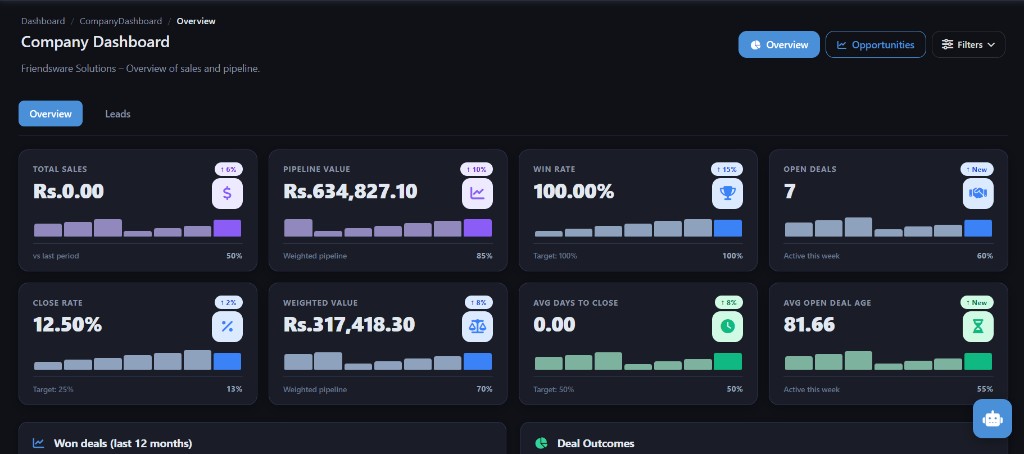
The application uses a module menu (CRM, Finance, HR, Real Estate, Construction, Inventory, Marketing, and administration). Breadcrumbs in the app help you see where you are. Documentation for the public site uses a separate docs sidebar.
From the dashboard you typically open a module, review KPIs, and jump to items that need attention (open leads, pending leave, low stock). Exact widgets depend on role and module entitlements.
KPI tiles and lists are generated from live company data. Treat them as operational signals, not as a substitute for formal financial reports.
Expected result: The operation completes without errors and data reflects your changes.
Use the navigation paths and steps in this article. If a menu is missing, check module entitlements and permissions.
Your role may lack the required permission, or the module may not be enabled for your company. Contact an administrator.
Contact the Smart Business 360 team if you cannot find the right guide.